Tip of the Week: Contacts


One of the benefits of legal billing software applications is avoiding retyping contact information for bills, statements, or documents. The various types of contacts have a hierarchical system in TimeSolv when creating invoices. It is important our users understand the best location to save their contacts. Contacts should only be entered once and then associated with the various Clients or Matters. This week’s Tip of the Week will take a look at what each type of contact means for invoicing purposes.
We generally recommend users save contact information under the Client-level which will feed to all Matters for invoicing purposes unless a Matters has a ‘Main’ or ‘Optional’ Invoice Contact designated. A Matter contact (‘Main’ or ‘Optional’) will override the Client contact (‘Main’ or ‘Optional’) and receive the invoice instead.
Click under Clients>Clients & Matters>[Client/Matter]>Contacts>New Contact
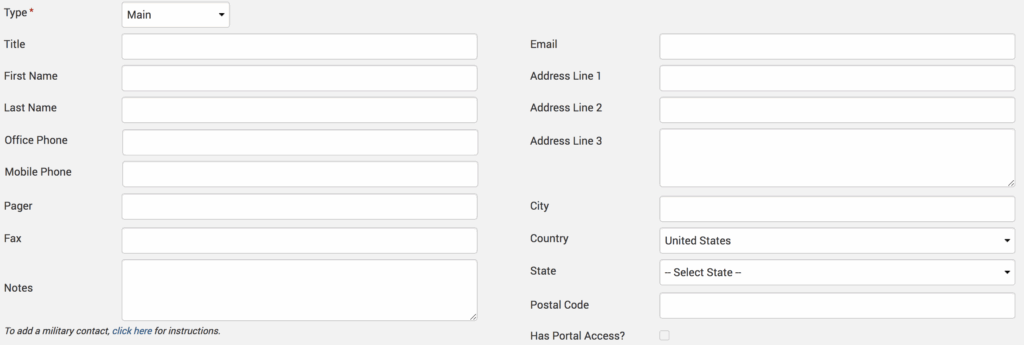
If the contact is saved as a ‘Main,’ this contact will be the one used in invoices, unless there is an ‘Optional Invoice’ contact, which will always supersede a ‘Main’ contact. A ‘Main’ contact would be, for example, the president of a company. An ‘Optional Invoice’ contact would be, for example, the accounting department of that company to where the president wants the invoices to be sent. Any contacts listed under ‘Related Party’ or ‘Other’ are for informational purposes only and do not receive or appear on invoices.
Below is the priority order in which the invoice will fetch contact information:
- Matter contact > Type ‘Optional Invoice’.
- Matter contact > Type ‘Main’.
- Client contact > Type ‘Optional Invoice’.
- Client contact > Type ‘Main’.
If contact details are missing at any of the above levels, the system will continue to go down the list in that order to fetch the contact details for the invoice being generated.
If you’d like to contact TimeSolv support for help, please call 1.800.715.1284 or Contact support!
wherever you do.
TimeSolv in action.