Tip of the Week: Mark Task/Expense Codes ‘Billable’, ‘Non-billable’, or ‘No Charge’


Marking Task/Expense Codes as ‘Billable’, ‘Non-Billable’, or ‘No Charge’ makes managing billable types for Tasks and Expenses so much easier. Today’s Tip of the Week will show our users how to specify the billable type for a Task/Expense Code.
Click on Time>Settings>Task Codes tab, or Expense>Settings>Expense Codes tab.
To edit an existing Task/Expense Code, click on the name of the code in the far left column. In the dialog box, you will see a dropdown where you will be able to select the billable type for that particular Task/Expense Code.
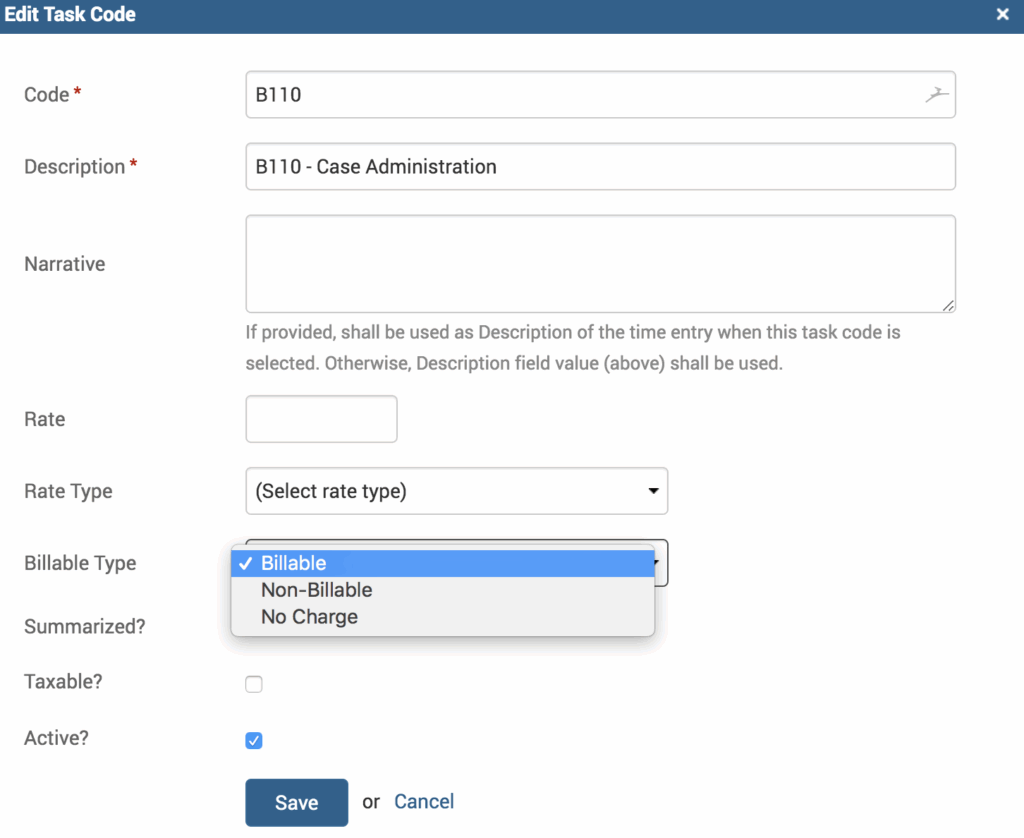
- Billable – the amount will be included in the invoice.
- Non-Billable – the amount will not be included or appear on the invoice. It is in the background for reporting purposes.
- No Charge – will show on an invoice, but with a zero dollar amount (it will appear as ‘No Charge’ written next to the entry).
Upon saving these changes, a success message will appear: “The default Billable Type for the Task Code has been overridden”. You can now generate Invoices/Reports for Billable Task/Expense with the actual amount provided while creating an entry.
If you’d like TimeSolv support for more help in understanding Task Code related billing settings in TimeSolv, please call 1.800.715.1284 or Contact support!
wherever you do.
TimeSolv in action.





