Holiday Secret Sale: Special savings for law firms. Find out now. View offer

PCLaw Data Conversion

How to Find PCLaw Working Directory

1. Open Pclaw and generate any report
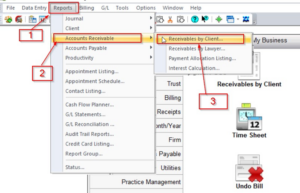
2. Save the Report
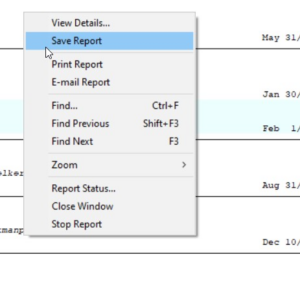
3. Copy the path of the folder in which the Report will be saved

4. Open the path copied in Windows Explorer

  1. You might have to go one folder back to find the main Folder that contains the following:
    1. COMMON
    2. DATA
    3. PCLAWDOCS
    4. DYN DATA
    5. LOCAL DATA
    6. RECORDIX
    7. STAT DATA

These folders are required for the conversion.

Zip the whole folder and send it to us using the sendthisFile link.

https://www.sendthisfile.com/f.jsp?id=VH27VUCWOtTfsi9tVvUI3NDk

Book a demo.
Schedule a personalized demo to learn how TimeSolv meets your needs.
Schedule now
Try for free.
No hassle, no credit card needed.
Try TimeSolv for 10 days free.
Start now
GET STARTED WITH TIMESOLV

Experience how easy TimeSolv has made time tracking

TimeSolv is part of ProfitSolv, a collection of best-in-class software solutions for professional services firms, allowing the freedom for growth and innovation. Using a product-centric and customer-first approach, ProfitSolv collaborates with firms to offer better client services.

© 2025 ProfitSolv, LLC, All rights reserved. ProfitSolv, TimeSolv, and respective logos are trademarks or registered trademarks of ProfitSolv, LLC and its affiliates. All product names and trademarks are the property of their respective owners.