Ability to Transfer Payments from Operating to Trust Account


With just a few clicks, you can transfer payments from an operating account to a trust account using the ‘Transfer’ option provided in the pop-up next to the ‘Allocate/Reallocate’ link at the end of the entry.
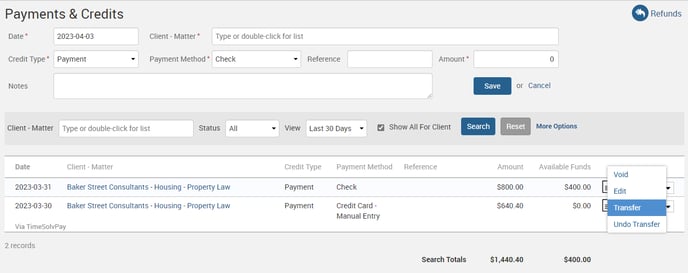
What’s more, you can transfer funds from allocated or unallocated payments, as long as a balance amount is available for transfer. Once you’ve selected the trust account, simply click on the ‘Transfer’ button to complete the transaction.

Trust transfers are displayed in a separate tab labeled ‘Previous Transfers’ when you click the ‘Allocate’ link from the Payments & Credits screen. You can also view transferred amounts as credits by filtering the search on ‘Group by Client’ on the Trust screen. And if you need to undo a transfer, simply navigate to the Trust screen and select the ‘Undo’ option.
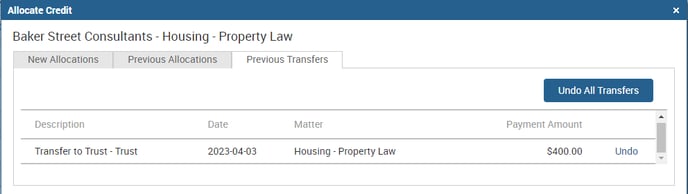
Please note that if a trust transfer has taken place, you must undo it before voiding a payment from the ‘Payments and Credits’ screen.
Upgrade your TimeSolv experience and streamline your firm’s financial management with the new transfer funds feature. Try it today!
wherever you do.
TimeSolv in action.