ResourcesBlogTime & Billing
Tip of the Week: Quickly view invoices with outstanding balances and resend to clients


Tip of the Week: Quickly view invoices with outstanding balances and resend to clients

Erica Birstler
Written by: Erica Birstler
Updated: 3 October, 2025
Share article

This week’s Tip of the Week will look at how users can quickly view invoices with outstanding balances and resend them out to their clients. This is a simple and easy tip to help our users save time when payments are due and reminders need to be sent out.

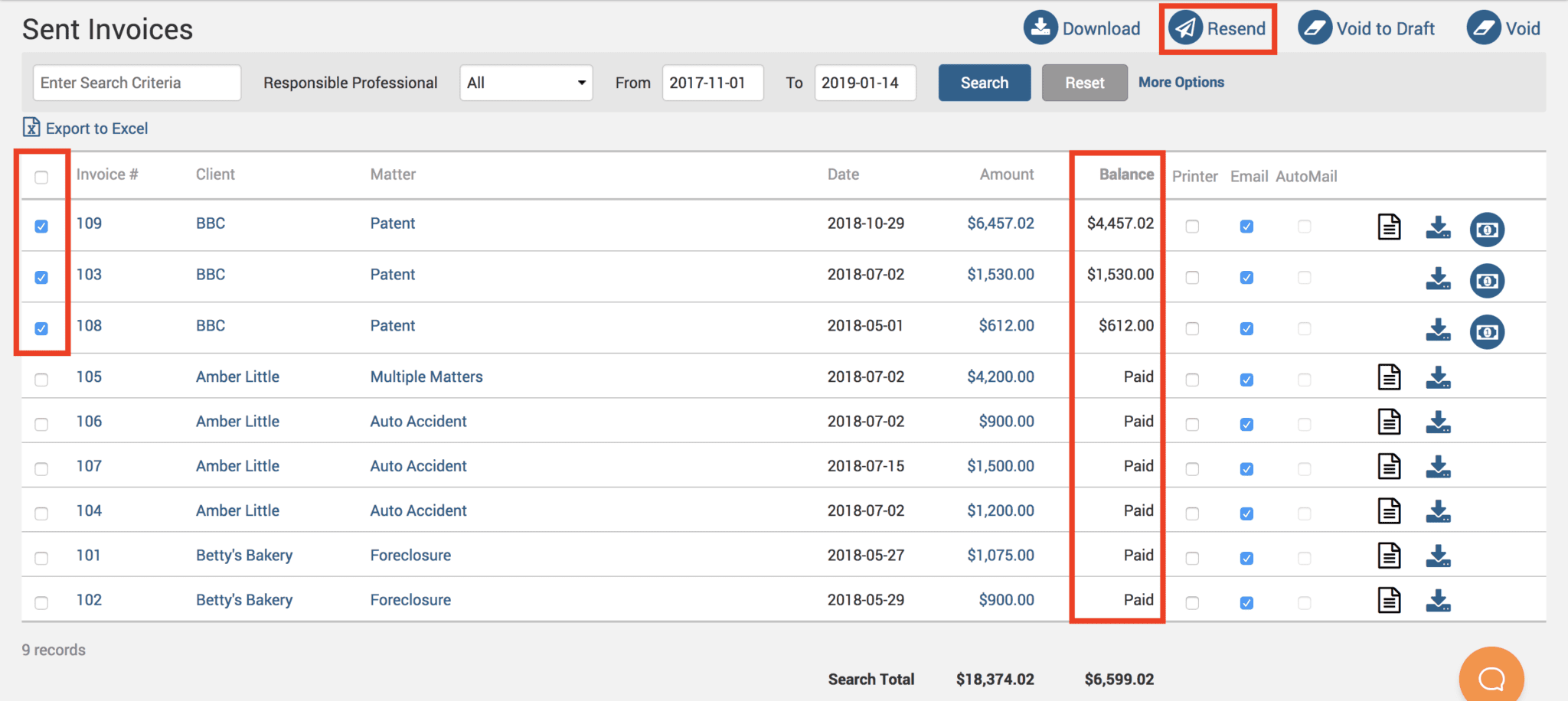
Head under Invoices>Sent screen. This screen will display all sent invoices in the date range shown at the top of the screen. Users can change this date range to pull up older invoices as needed, and hit the search button.

By default, the ‘Balance‘ column will be sorted by paid invoices. When the user clicks on the ‘Balance’ column it will sort unpaid balances to the top of the list. Simply click on the checkboxes next to the unpaid balance and hit the ‘Resend’ button on the top right of the screen.
If you’d like TimeSolv support to help you in understanding how to quickly view invoices with outstanding balances and resend them out to your clients, please call 1.800.715.1284 or Contact support.

Contact support


Share article
Written by
Erica Birstler
Erica Birstler is Senior Director of Product Research & Communications at ProfitSolv, the parent company of TimeSolv. Erica has over a decade of experience in the legal software industry, catering to the specialized technology needs of small to mid-sized law firms. She has given numerous presentations across North America on legal technologies such as law practice technology management, cloud computing, and legal billing & trust accounting compliance.
Erica Birstler

TimeSolv is part of ProfitSolv, a collection of best-in-class software solutions for professional services firms, allowing the freedom for growth and innovation. Using a product-centric and customer-first approach, ProfitSolv collaborates with firms to offer better client services.

© 2026 ProfitSolv Purchaser, Inc., All rights reserved. ProfitSolv, TimeSolv, and respective logos are trademarks or registered trademarks of ProfitSolv Purchaser, Inc. and its affiliates. All product names and trademarks are the property of their respective owners.