Tip of the Week: Commissions


TimeSolv has three different levels for calculating commissions. These three levels are the working attorney, responsible attorney, the originating attorney. It’s important our users understand where and when to enter the different commission amounts according to the firm’s commission structure needs. This week’s Tip of the Week takes a look at setting up commissions structure as well as running a Revenue & Commissions report.
To enable commissions, click on Account>Settings>General>Enable Commissions.

Originator Timekeeper commissions can be set under Clients>Clients & Matters>[Matter name]>Originators. TimeSolv allows users to add as many Originating Attorneys as needed against a Matter so that commissions can be distributed accordingly, and Administrators can specify a commission for each of the Originating Attorney added against a Matter.
Users with access to reports will also be able to see the commissions for each Originating Attorney at the reporting level. The reports that currently run Originating Attorneys are:
- Invoices and WIP Aging report
- Payment History report
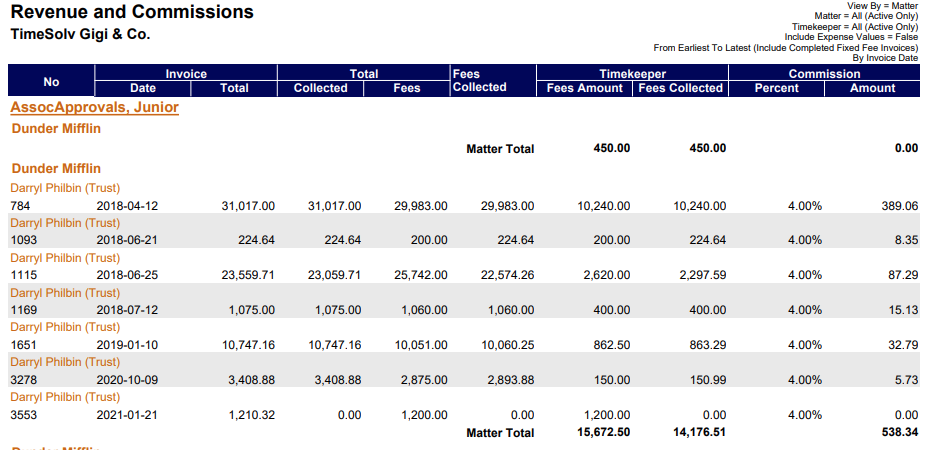
- Revenue and Commission report
Commissions for Responsibly Attorneys can be set under the Matter details: Clients>Clients & Matters>[Matter name] – under the ‘General’ tab there is a field to specify the ‘Responsible Timekeeper’. Once you select the Responsible Timekeeper, you will see a new field appear allowing you to define the commission amount.

Revenue and Commissions Report
Commissions on reports are only visible to Administrator users. To run a Revenue and Commissions report head under Reports>Revenue and Commissions Report. This report will display revenue and commissions collected per Timekeeper and Responsible Timekeeper. Commissions will appear with a percentage column and the amount collected column against the Timekeeper and Matter.
If you’d like to contact TimeSolv support for help, please call 1.800.715.1284 or Contact support!
wherever you do.
TimeSolv in action.