Tip of the Week: Running Payments in Batch for Sent Invoices


Imagine getting paid for a whole series of invoices with one click. TimeSolv allows users to run payments on invoices in batch! This means getting paid for dozens or even hundreds of invoices with one click, revolutionizing your revenue stream. That is our Tip of the Week today.
The first step in this process to make sure you have a payment processing account with TimeSolvPay.
The next step is process-oriented. TimeSolv recommends as part of your client intake you collect the preferred payment method for your client, either credit card of ACH/eCheck. Go to Clients>Clients&Matters and select the appropriate client. Under the Payment Settings tab, enter their payment information. If you have multiple matters with different payment methods for the same client, simply store that information at the Matter level under the Payment Settings tab.
TimeSolv also recommends establishing payment expectations with clients. For example, as part of your agreement with a client, designate that invoices will be paid 5 or 10 days after invoices are sent unless the client raises questions. Check with your Bar association for further guidance on this subject.
Once you have payment information stored in TimeSolv, from your Invoices>Sent screen you can select More Options at the top of the screen and select Payment Method on File to find only invoices for clients who have stored payment information.
Then, simply select the invoices you want to pay, and click the green Charge icon in top part of your screen.
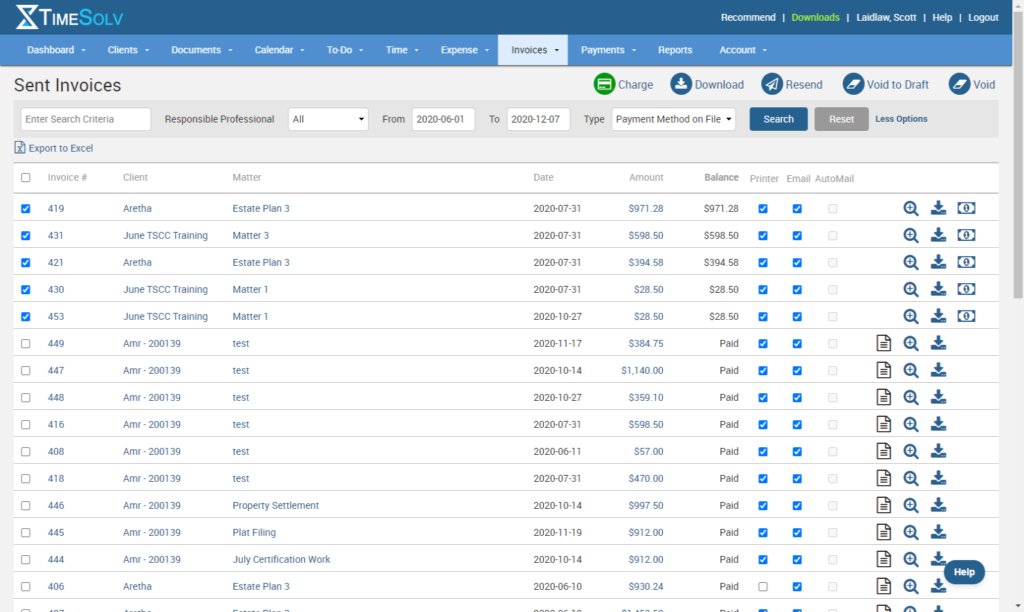
You’ve now been paid! If an invoice is not paid, a yellow warning triangle will appear that when hovered over will tell you the issue, like an expired credit card, for example.
This method of running payments for your invoices is truly a game-changer. You now not only have the ability to control when you get paid and but you can process thousands of dollars of revenue in seconds, saving massive amounts of time in your billing work.
TimeSolv calls this method ZERO AR because you can quite literally have no money in your Accounts Receivable column.
To learn more about the concept of ZERO AR, click here to watch our webinar.
If you’d like to contact TimeSolv support for help, please call 1.800.715.1284 or Contact support!
wherever you do.
TimeSolv in action.





